Apple Announced the IOS 17 at its annual developer conference, but it’s not being discussed much. The Vision Pro headset stole the show at the conference for good reasons. As usual, We expect a complete rollout of the new OS in the fall. The first developer preview will be out by now, then a public Beta release early next month.
IOS 17 comes with not so many improvements but little improvements that matter to users. The new additions work seamlessly across all Apple devices.
There is a new live voicemail feature which means you don’t have to pick up a call when someone you don’t know is calling. It will pick up for you and display a live scrolling text of what the person is saying. This will help you decide if it’s worth talking to them. Calls identified as spam by network carriers won’t appear as live voicemails. The transcription is handled entirely on the device.
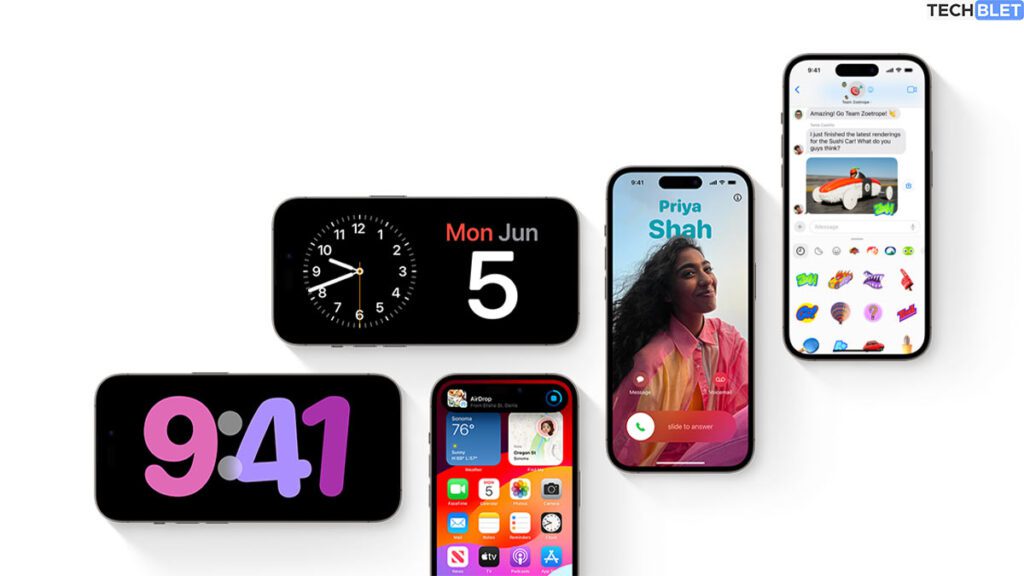
There is a new customizable call screen that Apple calls contact posters. You can change how they appear and choose beautiful treatments for photos or Memoji with any typography or font color. These work in third-party apps and when you want to share contact details through NameDrop.
NameDrop lets you share your contact by tapping your iPhone or an iPhone to an Apple Watch. You can also tap your phones to share music or video simultaneously on two devices. Each of you will play the music or video via your device.

Facetime now lets you leave audio or text messages when you call someone and they are unavailable. There are also video reactions on Facetime that can be activated with simple gestures and will be available on third-party apps. You can also now make and take your Facetime calls on your Apple TV or start a call on your Apple TV and hand it over to Apple TV.
The Journal app is new on IOS 17, and as the name implies, it’s about journaling which has been shown to improve well-being. Apple said suggestions for what to journal would be from your recent activities, including photos, people, places, workouts, and more. They want to make it easy for you to access the journal app.
The Keyboard gets a new AI-enhanced autocorrect inline prediction and a new speech recognition model. This is meant to improve how you type on the keyboard. iMessage has also improved searching abilities with filters, swipe-to-reply function, transcribe voice messages, real-time location updates in the app, improved emoji stickers, and live stickers from photos.
Check-in is a new safety feature that takes over the chore of check-in with family members when traveling. If you initiate a check, a family member or friend will be automatically informed when you arrive at your destination. If you are not progressing toward the location, the contact will get your device location, battery level, and cell service status.
Standby is the new full-screen experience that pops up when you want to use your iPhone on a nightstand. Or in a kitchen desk or landscape mode. It shows beautiful clocks, favorite photos or widgets, including intelligent stacks. There is also support for live activities, Siri, Incoming calls, larger notifications to aid usability when viewed at a distance.
The assistant call sign with the new update is just “Siri”; no need to say “Hey Siri.” There is also support for back-to-back commands, something Google Assistant has had for years.
Apple Maps gets support for offline maps, which makes sense, and Safari adds more protection for private browsing. The health app has a new set of mental health features, and apple music also introduces a collaborative playlist to enjoy with your friends.